
Most Now Assist programs we get called into aren't failing because the models are bad. They're failing because the sequence was wrong. Somebody bought Pro Plus, turned on every skill the Now Assist Admin console would let them, pointed it at a knowledge base nobody has curated since 2019, and then wondered why the summaries were wrong and the agents didn't trust it.
Sequence is the whole game. Generative AI on the Now Platform is a mirror: it reflects the quality of your data, your process discipline, and your governance back at you, at scale, in front of every user. If those are good, Now Assist looks like magic. If they're not, it looks like a liability. And once you move into AI Agents, that mirror starts taking actions.
This is the order we recommend, and why. It's written for platform owners, service owners, and the architects who have to defend the roadmap in a steering committee. It assumes you're on Zurich or Australia. If you're older than that, the upgrade is item zero, not item one.
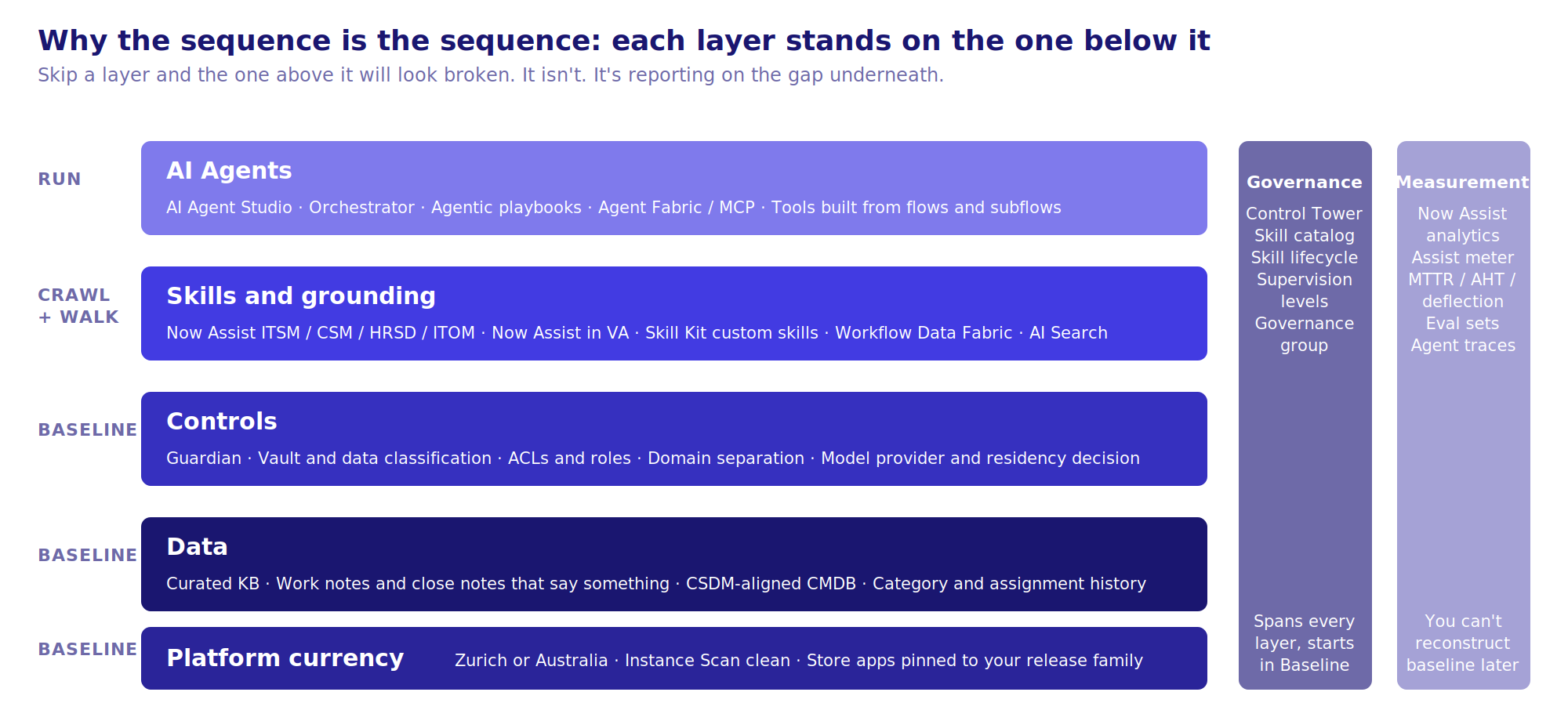
The short version of this whole post. Skip a layer and the one above it will look broken. It isn't; it's reporting on the gap underneath.
Baseline: Earn the right to turn it on
Nothing in this phase is AI. All of it decides whether AI works.
Platform currency and posture
You need Zurich at minimum, and Australia if you intend to run AI Agents seriously this year. The AI Agent Studio, AI Control Tower, and the Guardian controls have moved fast release over release, and being N-1 on this specific capability set means missing real functionality, not just patches. Get the upgrade done, get Instance Scan clean on the AI-relevant findings, and confirm your Now Assist Store apps are pinned to the family you're actually on. We've seen more than one program lose a month because the Now Assist ITSM app was two versions behind the platform.
Data quality, specifically the data the models will read
Be precise about this. Now Assist for ITSM doesn't need your whole instance to be clean. It needs:
- Incident and case short descriptions, descriptions, work notes, and close notes. Summarization and resolution-note generation read these. If your agents have been closing tickets with "fixed" for five years, summarization will faithfully tell you the ticket was fixed.
- Knowledge articles. Both Now Assist Q&A in Virtual Agent and AI Search Genius Results are grounded in KB content. Run a knowledge audit before anything else: article age, ownership, view-to-helpfulness ratio, duplicates, and whether the article actually contains steps or is a stub pointing to a wiki nobody can reach. Retire ruthlessly. A 400-article knowledge base that's accurate beats a 4,000-article one that isn't.
- Categorization and assignment data. Not for the LLM directly, but for the classic Predictive Intelligence models you should still be running. PI classification and similarity are cheaper, faster, and more predictable than a generative skill for routing. Don't rip them out because something newer showed up.
- CMDB and CSDM alignment, if you plan to go anywhere near ITOM alert analysis or change risk. The models will describe the topology you have, not the one you wish you had.
Security and privacy controls
This is where legal, security, and the platform team need to be in the same room before a single skill is enabled:
- Now Assist Guardian configuration: sensitive data handling, offensiveness filtering, and prompt injection protection. Decide what "sensitive" means for your organization and configure the data classifications accordingly. The default is a reasonable start; it is not your policy.
- Vault (or your existing encryption and data classification approach) for fields that should never reach a model. Know which fields those are before you find out in a summary.
- Domain separation implications if you're an MSP or run a separated instance. Skill availability and data scoping behave differently, and you want to test this explicitly.
- Which provider you're using. Now LLM versus bring-your-own model through the Generative AI Controller has legal and residency implications. Decide once, document it, and put it in the AI governance charter.
Licensing and metering
Now Assist consumption is metered in assists. Understand your entitlement, what counts as an assist for each skill, and how consumption gets reported. Set up the Now Assist analytics dashboards on day one so you have usage and adoption data from the first hour of go-live. You will need this data for the business case for the next phase, and you can't reconstruct it later.
Governance and measurement baseline
Stand up an AI governance group now, while the stakes are low. It should own the skill catalog, approve new skills and agents, own the Guardian policy, and review the AI Control Tower inventory once that's in play. Keep it small: platform owner, a service owner or two, security, and someone from legal or compliance who returns emails.
Then capture the baseline numbers you'll be asked to move: mean time to resolve, average handle time, first-contact resolution, self-service deflection, KB creation rate, and agent time on documentation. If you can't say what those were before Now Assist, you won't be able to say what Now Assist did.
Lesson learned:
The single most common cause of a stalled program is skipping this phase because the license clock is running. Four weeks of baseline work here is the difference between a pilot that expands and a pilot that quietly gets turned off.
Crawl: Assistive skills, human always in control
The goal of Crawl is not ROI. It's trust, telemetry, and operational muscle memory. Pick skills that are read-only from the platform's point of view, that produce text a human reviews before anything happens, and that are hard to get catastrophically wrong.
Where to start
Now Assist for ITSM, agent-facing skills:
- Incident summarization in the Now Assist panel. Highest adoption, lowest risk, immediately visible value on handoffs and escalations.
- Resolution notes generation. Agents review and edit before saving. This also starts fixing your close-notes data problem going forward, which pays off in later phases.
- Knowledge article generation from resolved incidents, routed through your existing KB approval workflow. Do not let this publish directly. Ever.
- Chat and interaction summarization for agents handling Virtual Agent or live chat handoffs.
Now Assist for Creator, for the platform team:
- Code generation and flow generation in the IDE and Workflow Studio. Low external risk, keeps your own team learning the tooling before they have to support it for others.
AI Search Genius Results for end users, if your KB audit came back clean. If it didn't, hold this until Walk. A bad answer in a search result is a bad answer in front of everyone.
What to hold
Now Assist Q&A in Virtual Agent is tempting, and it's fine if your knowledge is solid, but it's the first place a stale article becomes a customer-visible problem. Treat it as a late-Crawl or early-Walk item gated on KB health, not a day-one item.
Process, not just configuration
- Roll out by assignment group, not by instance. Turn on skills for two or three high-volume groups, get their feedback, tune, and expand. The Now Assist Admin console makes this easy to do and easy to skip.
- Tell agents what changed and why. A panel appearing with no explanation gets ignored or mistrusted. A fifteen-minute walkthrough with the group lead who volunteered gets used.
- Review the outputs. Sample summaries and resolution notes weekly for the first six weeks. You're looking for hallucinated details, tone problems, and sensitive data leaking into notes. The Guardian catches some of this; humans catch the rest.
- Report assists and adoption monthly. Skill usage by group, thumbs up and down feedback, and the trend line. This is the data that funds Walk.
Lesson learned:
Summarization quality tracks ticket data quality almost one to one. Teams that see poor summaries usually discover the problem is their own work notes. That's a useful discovery, but it's better to have it in Baseline than to have it in front of a skeptical service desk lead.
Second lesson: Don't enable every skill because it's included. Every skill you turn on is a skill you have to explain, monitor, and defend. Five well-adopted skills beat twenty half-used ones.
Walk: Extend, ground, and customize
You've got trust and data. Walk is about breadth across workflows, grounding the models in your own context, and building the custom skills that generic ones can't cover.
Broaden across products
- Now Assist for CSM: case summarization, agent response generation, and Q&A grounded in your customer-facing knowledge. Same discipline as ITSM, with more attention to Guardian tone and sensitive-data controls because the output can be customer-visible.
- Now Assist for HRSD: case summarization and knowledge Q&A. HR has the strictest data sensitivity of anything you'll touch; involve the HR data owner from the start, not after the first complaint.
- Now Assist for ITOM: alert analysis and grouping explanations. Only worthwhile if your CMDB and service mapping are credible.
- Now Assist in Virtual Agent with LLM-based topic discovery and Q&A, now that the knowledge base has been through a cycle of scrutiny.
- Dynamic translation across VA and agent workspace if you support multiple languages. Underrated and often a quicker win than anything else in this list for global orgs.
Ground the models in your data
This is where Workflow Data Fabric and the zero-copy connectors earn their keep. Skills and agents are only as useful as what they can see, and a lot of what matters lives in Snowflake, Databricks, a data warehouse, or a SaaS system that isn't ServiceNow. Bringing that context in without ETL means the summarization of a customer case can actually reference the customer's contract state, or a change can be assessed against real deployment history.
Build custom skills
Now Assist Skill Kit is the tool. Use it when a generic skill is close but not right: a summarization that needs to follow your major incident communication template, a generation skill that needs to reference a specific set of fields, a classification that needs your taxonomy. A few rules that have served us well:
- Write the prompt like a spec. Inputs, expected output structure, what to do when information is missing. Vague prompts produce vague skills.
- Test against real records from your instance, not synthetic examples. Keep the test set and re-run it after every platform or model update.
- Version and document every custom skill in the governance catalog. In six months nobody will remember why it was built the way it was.
- Prefer a custom skill over hacking a UI Action to call the Generative AI Controller directly. The Skill Kit gives you metering, Guardian integration, and analytics for free. Direct calls give you none of that.
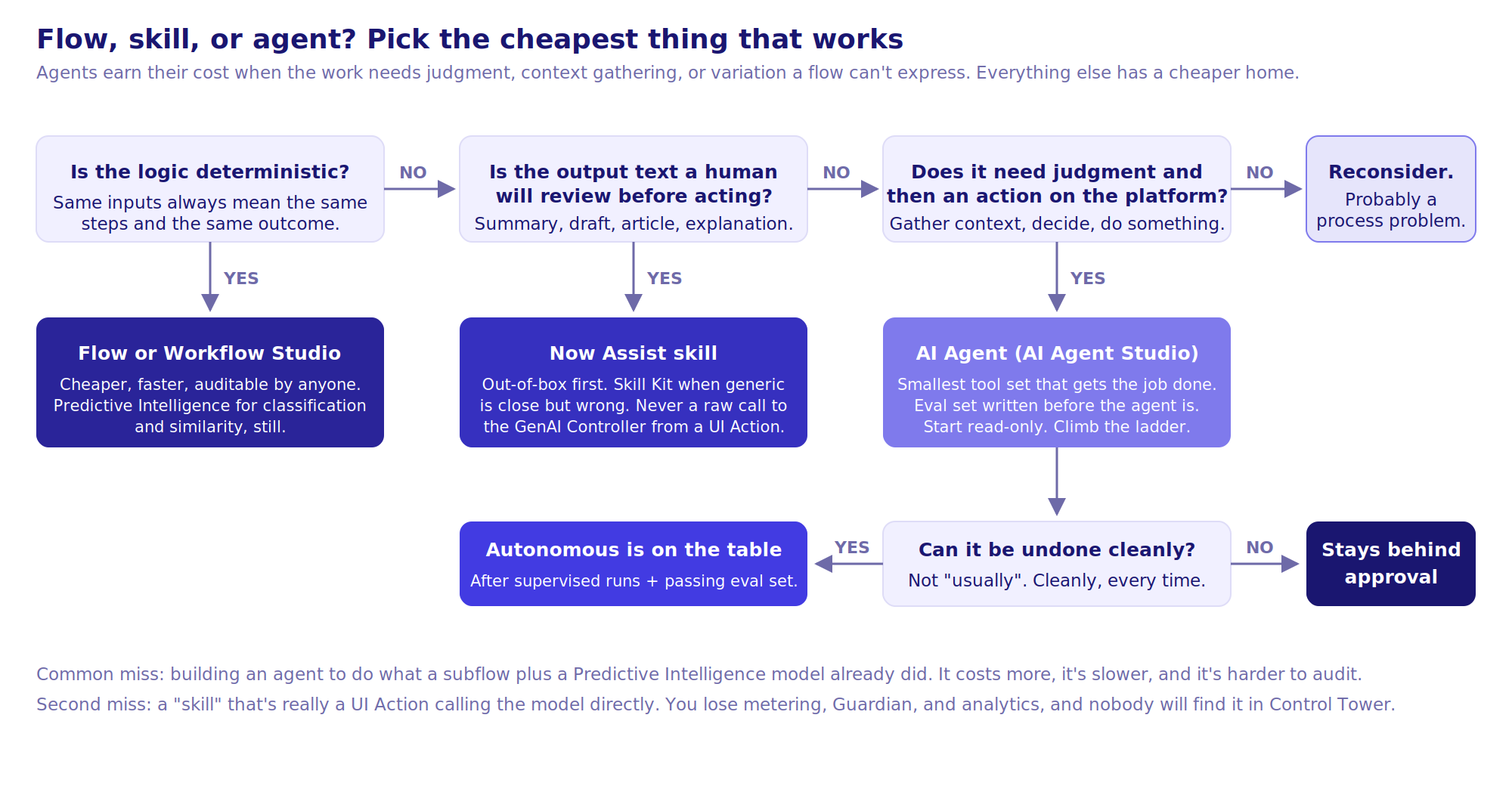
By this point you'll have people asking for "an agent" for everything. This is the decision we walk teams through before anything gets built:
Harden governance
- Tune Guardian based on what you saw in Crawl. You have real data on false positives and misses now.
- Get AI Control Tower running so you have an inventory of every skill, custom skill, and (soon) agent on the platform, who owns it, and what data it touches. This becomes non-negotiable in Run; it's much easier to establish here.
- Formalize a skill lifecycle: request, review, build, test, approve, monitor, retire. It sounds bureaucratic. It's the reason you'll still have control in a year.
Lesson learned:
The hardest part of Walk is almost never technical. It's that each new workflow brings a new business owner with a different risk appetite and a different definition of "good enough." The governance group exists so those conversations happen once, in one place, with a shared standard, rather than in every steering committee.
Run: Agentic AI, with a human deciding how much rope
Everything up to now has been generating text for a human to act on. Agents act. That changes the risk profile completely, and the architecture and governance need to reflect it.
The building blocks
- AI Agent Studio for defining agents: their role, instructions, tools, and the guardrails around them.
- Tools are what agents can do: Flow Designer flows and subflows, scripts, record operations, retrieval over your knowledge and data, and integrations exposed through Integration Hub or Agent Fabric and MCP-style connections to external systems. The tool set defines the blast radius.
- AI Agent Orchestrator coordinates multiple agents against a goal. This is where cross-functional work happens, and where the failure modes get interesting.
- Agentic playbooks in Zurich and Australia embed agents into your existing playbooks with human checkpoints. For most organizations this is the right on-ramp: the process stays visible, the human stays in the loop, and the agent handles the steps that are tedious and well-defined.
- AI Control Tower for monitoring, auditing, and inventory across everything above.
Sequence inside Run
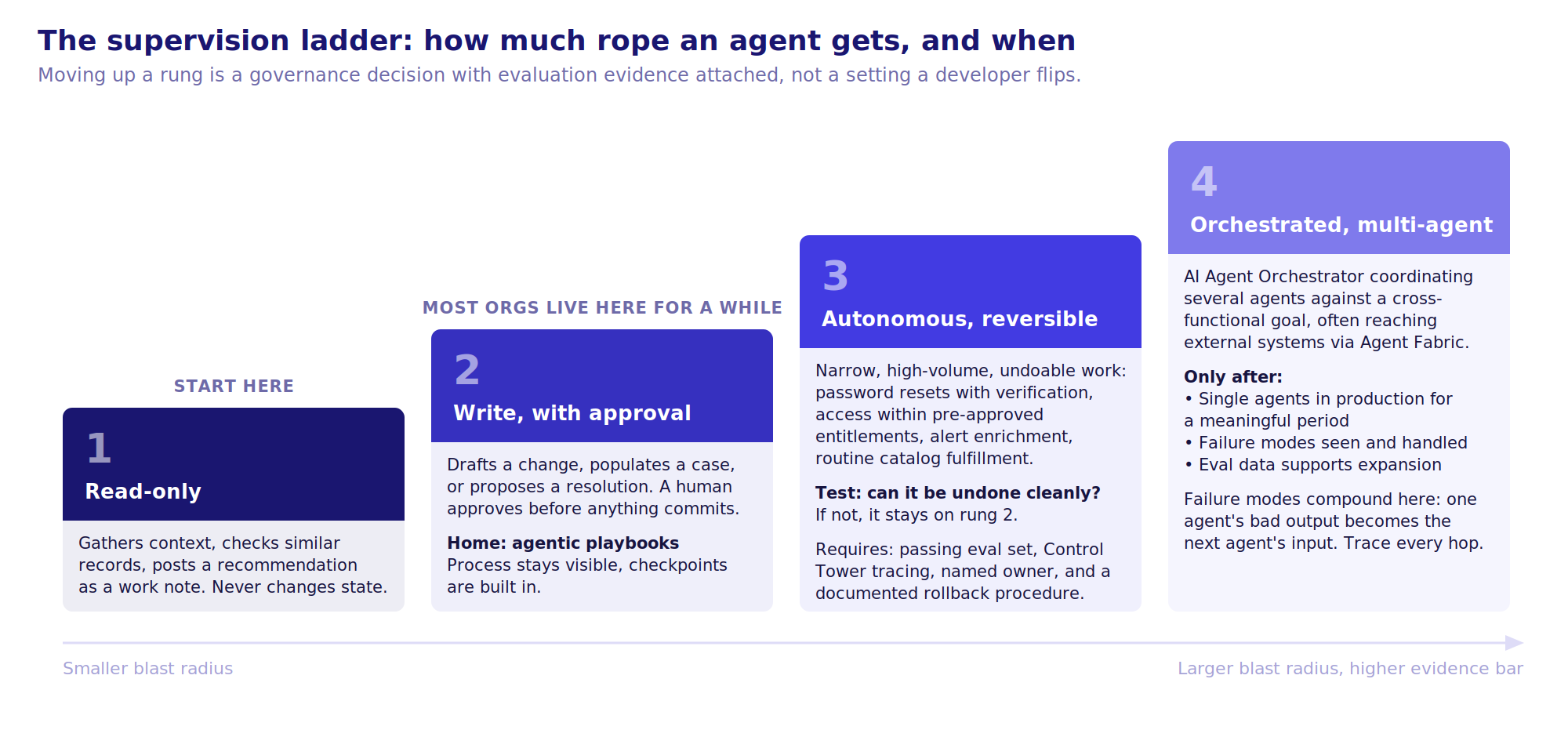
- Read-only agents first. Triage agents that gather context, check similar incidents, pull CI health, and post a recommendation as a work note. They never change a record state. You get to evaluate their judgment with zero operational risk.
- Bounded write agents with approval. Agents that draft a change, populate a case, or propose a resolution, with a human approving before anything commits. Agentic playbooks are the natural home for this.
- Autonomous agents for narrow, reversible, high-volume work. Password resets with verification, access provisioning within pre-approved entitlements, alert enrichment and correlation, routine catalog fulfillment. Reversible is the key word. If the action can't be undone cleanly, it stays behind an approval.
- Orchestrated, multi-agent workflows only after you've seen single agents behave in production for a meaningful period and you have evaluation data to back the expansion.
Engineering discipline that matters more here
- Tool design is the real work. A well-scoped subflow with clear inputs and outputs makes a reliable agent. A tool that can "update any record" makes an unpredictable one. Give agents the smallest tool set that gets the job done.
- Write evaluation sets before you build. Fifty representative scenarios with expected outcomes. Run them on every change to instructions, tools, or the underlying model. Agents drift; the eval set tells you when.
- Instrument everything. Every agent run should be traceable in Control Tower: what it was asked, what tools it called, what it decided, and why. When something goes wrong, and it will, this is how you find out whether it was the instructions, the tool, the data, or the model.
- Set explicit supervision levels per agent and treat moving an agent from supervised to autonomous as a governance decision with evidence attached, not a checkbox a developer flips.
- Don't build an agent where a flow will do. If the logic is deterministic, Flow Designer is cheaper, faster, and auditable by anyone. Agents earn their cost when the work requires judgment, context gathering, or handling variation a flow can't express.
Lesson learned:
The organizations that get value from agents fastest are the ones that were rigorous in Walk. They have clean tools because they built custom skills properly, they have governance because Control Tower is already populated, and they have baseline data so they can prove what changed. The organizations that jump straight to Run typically spend the first quarter rebuilding the foundation they skipped, except now with an executive who was promised autonomy watching.
What the timeline actually looks like
Every steering committee asks the same question: how long? The honest answer is that it depends almost entirely on the state of your knowledge base and your close notes, not on the AI. But "it depends" doesn't get a program funded, so here's a reference timeline and three variations we've seen play out.
Reference: mid-size enterprise, ITSM-led, Pro Plus
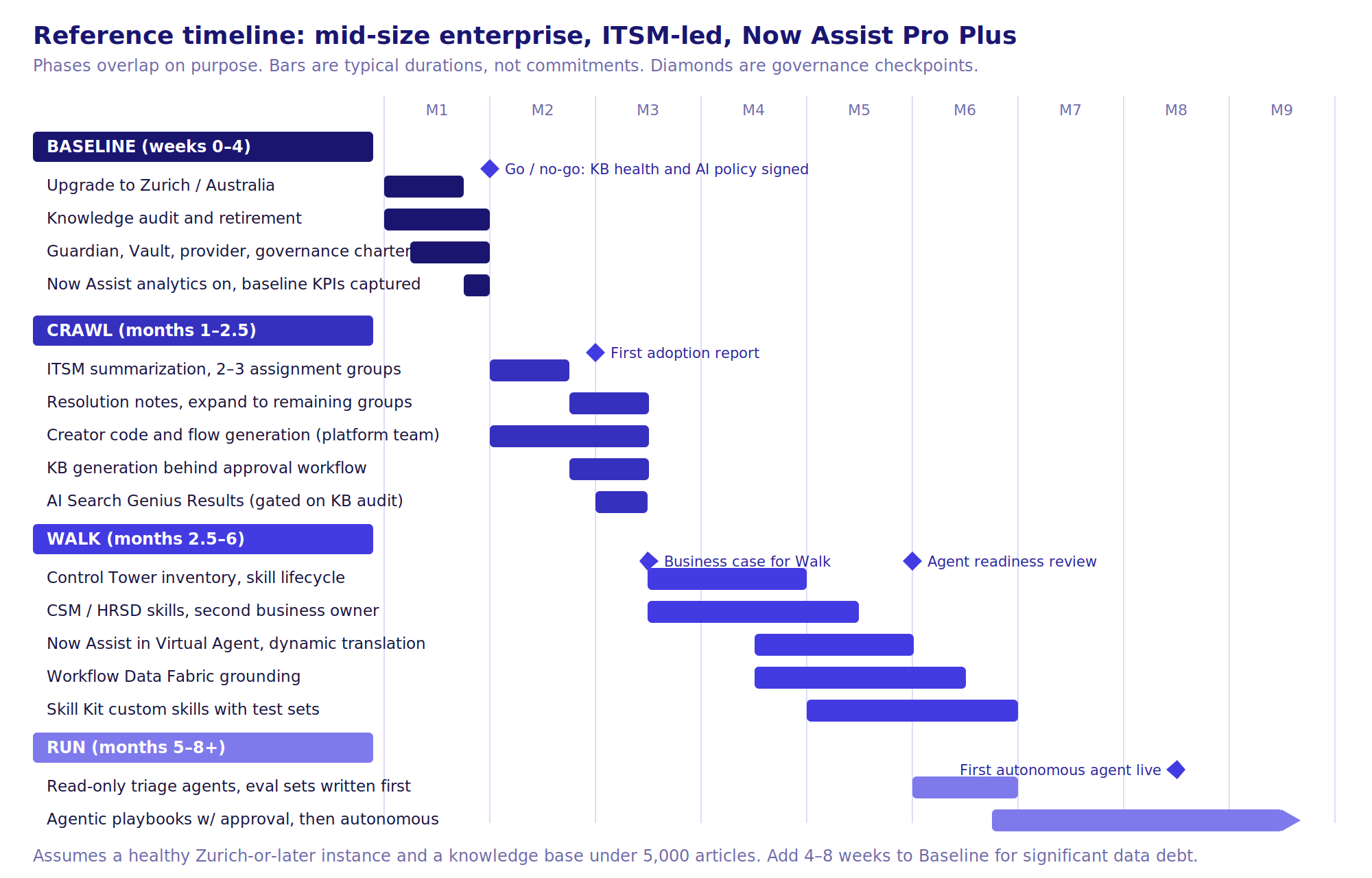
A few things to notice in that picture:
- Phases overlap. Control Tower and the skill lifecycle start while Crawl is still expanding. Read-only agents start while custom skills are still being built. Waiting for each phase to fully close is how an 8-month program becomes a 12-month one.
- The checkpoints are governance events, not project milestones. The go/no-go at week four is a real decision. We've recommended "no" at that point more than once, and every time it was the right call.
- Run doesn't finish. The arrow past month 8 is deliberate. Agents are an operating model, not a deliverable.
Three variations on that timeline
| Profile | What's different | Baseline | Crawl | Walk | First autonomous agent | Total to Run |
|---|---|---|---|---|---|---|
| Mature platform — Zurich or Australia, KB governed, CSDM done, existing PI models in use | Baseline is mostly verification. Crawl can roll out to all ITSM groups in one wave. | 2–3 weeks | 4–5 weeks | 2–3 months | Month 5 | ~5–6 months |
| Reference — healthy instance, some KB debt, ITSM-first | The timeline above. | 4 weeks | 6 weeks | 3.5 months | Month 7–8 | ~8 months |
| Data debt — N-2 or older, 8k+ articles nobody owns, close notes say "resolved" | Upgrade plus a real knowledge program before anything visible ships. Expect executive pressure to skip this. Don't. | 2–3 months | 2 months | 4 months | Month 11+ | 11–13 months |
| Multi-workflow from day one — ITSM, CSM and HRSD all funded, three business owners | Baseline is per-workflow: three KB audits, three sensitivity reviews, one governance body. Crawl runs in parallel with ITSM two to four weeks ahead. | 6 weeks | 2.5 months | 4 months | Month 9 | 9–10 months |
The number to watch isn't total duration; it's time to the first adoption report with real numbers in it. In the reference timeline that's month two. If you're past month three without one, something in Baseline was skipped and the program is about to find out which thing.
What compresses the timeline, and what doesn't
Compresses it: a knowledge base someone actually owns, a platform team that's already on Zurich or Australia, an existing governance body you can extend rather than create, and a service desk lead who wants this to work.
Doesn't compress it: buying more licenses, adding more developers to Baseline, or starting with agents "because that's where the value is." The value is where the data is.
Outcomes by phase
| Phase | Core features | What you should be able to show |
|---|---|---|
| Baseline | Zurich/Australia upgrade, KB audit, Guardian and Vault config, assists entitlement, Now Assist analytics, governance charter | Clean KB metrics, documented AI policy, captured MTTR/AHT/deflection baselines |
| Crawl | Now Assist ITSM summarization and resolution notes, KB generation with approval, Creator code/flow gen, AI Search Genius Results | Adoption by group, reduced documentation time, agent feedback scores, assist consumption trend |
| Walk | CSM/HRSD/ITOM skills, Now Assist in VA, dynamic translation, Workflow Data Fabric, Skill Kit custom skills, Control Tower inventory | Measurable MTTR and AHT movement, deflection lift, custom skills in a governed catalog |
| Run | AI Agent Studio, agentic playbooks, Orchestrator, Agent Fabric integrations, Control Tower monitoring | Autonomous resolution rate for targeted use cases, audited agent runs, evaluation pass rates, cost per resolution |
The point of view
There is real pressure to move fast on this, and the platform makes moving fast easy. That's exactly why sequence matters. Every phase above builds an asset the next one depends on: the data that grounds the models, the telemetry that funds the expansion, the governance that lets you say yes safely, the tools that make agents predictable.
You can compress the timeline. You can't skip the steps. The organizations we've watched succeed treated Now Assist as a platform capability with a lifecycle, not a feature to be switched on. The ones that struggled treated it as a procurement event.
If you're trying to figure out where your instance sits on this sequence, or you've already turned things on and want to know what to fix first, that's a conversation we have often. Get in touch with MadeLogic.